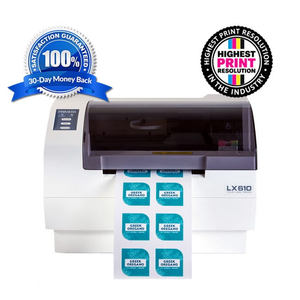
LX610 Color Label Printer with Plotter/Cutter

LX610 Color Label Printer with Plotter/Cutter Reviews

A product’s star rating is calculated as the average of all its reviews.


Primera Technology logo

Sold by Primera Technology

www.primera.com

•

5.2K Reviews

4.7

Reviews on this page are opinions of reviewers of Primera Technology, and Trustpilot does not endorse them or any products.


Product details

LX610 Color Label Printer with Plotter / Cutter with PTCreate Standard Print and cut custom labels in squares, rectangles and circles – all in one simple, unattended process. Also offers the highest print resolution in the industry at 1200 x 4800 dpi. Request a Sample LX610 Color Label PrinterMake labels for your products in virtually any size or shape.Download Brochure Volume:Up to 3,000/day Print Speed:Up to 4.5 inches per second Print Width:4.1” (104mm) - die-cutting, 5” (127mm) - pre-die cut labels Cutter:Built-in die-cutting knife blade and pizza wheel cutter Best print quality in the industry at 1200 x 4800 dpi. Now Available w/ CMY+ Ultra Black Dye Ink Software:PTCreate Standard for PC is included for cutting squares, rectangles and circles. PurchaseLX610 & PTCreate Pro Software Bundlefor cutting unique shapes. Make Your Own Product Labels withPrimera’s LX610 Color Label Printer with Built-In Plotter CutterAutomatic, Built-in Die-CuttingLX610’s printing and precision die-cutting are incorporated into one easy, time-saving step. Just import your design and select a cut format. Choose from standard die-cuts – such as squares, circles, or rectangles in any size, or a contour cut that automatically and precisely follows the outline of the image*. You’ll never need to order a custom die again.*Countour cutting requires an optional software upgrade, PTCreate Pro™

How does LX610 work?Three Simple Steps!Import your label image into the included PTCreate or PTCreate Pro softwareDrag a shape around the image and type in the desired dimensions. Included shapes in PTCreate include squares, circles, rectangles, ovals and starbursts. For more intricate designs, PTCreate Pro is required.Specify a quantity and hit “Go.” PTCreate and your LX610 will do the rest. After your label is printed, it is cut out to your desired shape and ready to apply to your products.LX610 Case Study: Bellus All Natural LabsPrimera visits Michael Cimo, owner and founder of Bellus All Natural Labs in Pompton Plains, New Jersey, to find out how their Primera LX610 Color Label Printer is helping their business grow.Order Clear Gloss Lamination Labels for Use with LX610Order HereNow You Can Make Labels Produced on LX610 Waterproof and Outdoor-Durable!Lamination Mode is now a selection in the printer’s PrintHub™ status Monitor.Here’s how it works.In PrintHub, select “Laminate Mode”Send a print/cut file to the printer as usualThe printer prints the image, feeds it out the front of the printer and stopsApply an optically clear, 4-mil polyester laminate patch by handPush any button on the control panel to pull the printed image back into the cutterThe now-laminated image is cut to size and shape – any shape – with the built-in X/Y cutting bladeLabel dispenses out the front and can then be cut and stacked into individual, laminated, custom-cut sheets. Primera Color Label Printers deliver the highest-resolution, photo-quality inkjet label printing in the industry, producing exceptionally sharp images, vibrant colors, and fine detail. With resolution up to 1200 × 4800 dpi, your products stand out on the shelf with professional-quality labels that capture attention, elevate your products, and strengthen the perception of your brand.Compare Printers Daily Volume:    1 to 1000 1 to 3000 1 to 3000 1 to 5000 1 to 7500 Print Width:    4.25" (108mm) 5" (127mm) 5" (127mm) pre-die cut labels
4.1" (104mm) die-cutting 8.25" (210mm) 8.25" (210mm) On-Demand Die-Cutting:    No No Yes No No Print Speed (up to):    2.5"/sec. (64mm/sec.) 4.5"/sec. (114mm/sec.) 4.5"/sec. (114mm/sec.) 4.5"/sec. (114mm/sec.) 4.5"/sec. (114mm/sec.) Ink Cartridge:    Single CMY, ultra-high yield Single CMY, ultra-high yield Single CMY, ultra-high yield Single CMY, ultra-high yield Separate CMY ink tanks Ink Type:    Dye Standard Dye, Pigment or CMY+ Ultra Black Dye Standard Dye, Pigment or CMY+ Ultra Black Dye Standard Dye, Pigment or CMY+ Ultra Black Dye CMY+ Ultra Black Dye or Pigment Top LX610 Markets

Manufacturers across hundreds of markets from specialty foods to cosmetics use Primera LX-series label printers to print their high-quality, short-run labels. 

Barcode Labels Beer, Wine & Spirits Labels Candle Labels Candy & Snack Labels Chemical Labels Coffee / Tea Labels Cosmetic Labels Name Badge Labels Sauce & Dressing Labels Spice Labels Specialty Food Labels Vitamin & Supplement Labels Water Bottle Labels Wine Labels Audio Production Education Government Disc Publishers for Healthcare Video Production Worship

Manufacturers across hundreds of markets from specialty foods to cosmetics use Primera LX-series label printers to print their high-quality, short-run labels. 

Professional and Event Photography Photo Booths Amusement LX610 Color Label Printer "This company has the best customer service I have ever experienced. That alone keeps me buying, well and the LX610 is amazing. by Ronald Jones Important note for customers purchasing outside of the USA:If you plan to purchase the PTCreate Pro software, please orderthis bundle, which includes both the LX610 and PTCreate Pro software. Or place an order for the PTCreate Pro software separately by calling our office at +1-763-475-6676 or emailsale@primera.com. Customers outside of the USA are not able to purchase the PTCreate Pro software on our web store.PTCreate Standard vs. Pro

All reviews


Rated 5 out of 5 stars

Works as advertised. What more can I ask for.

Primera Technology logo

Reply from Primera Technology

Hi Tom,
Thanks for the high marks for our LX610 Color Label Printer. We're grateful for your feedback.
Sincerely,
The Primera Team

Rated 5 out of 5 stars

The software takes some getting used to. It is a true machine that keeps on going. Amazingly, we can print one label or many right on the fly. But again, the software is a bit rough and painstaking. I still give it a five star due to the fact that it is a product that does what it says.

Primera Technology logo

Reply from Primera Technology

Dear Charlie Pierce,
Thank you for the 5-star review and for the feedback on the software. We'll share your comments with our engineering team.
Thank you,
Primera

Rated 4 out of 5 stars

I initially purchased a refurbished LX610, but unfortunately, it had issues right out of the box. I then decided to send the LX610 back within the timeframe to get a full refund and purchased a new one. Through the whole process, the Primera staff that worked with me where very helpful and a pleasure to work with. The return process was simple and efficient. The new printer worked from the time I unpacked it and now I have several hundred prints through it with no major complaints. It does skip cutting a label in some of the runs, but I'm confident we can work out that kink. The only reason I did not give a 5 star was because of the initial purchase (refurbished) that I had to send back. I would recommend this product to anyone looking for a printer for short runs.

Primera Technology logo

Reply from Primera Technology

Hi Qunitin,
We're happy to hear that support was able to take care of you in a helpful and timely manner. Thank you for your review.
Primera

Rated 5 out of 5 stars

Awesome machine!

Primera Technology logo

Reply from Primera Technology

Hi Becky,
We're so happy to hear your LX610 Color Label Printer is working well for you. Thank you for your great review.
Primera

Rated 5 out of 5 stars

This works very well and is perfect for my applications.

Primera Technology logo

Reply from Primera Technology

Dear Jay,
We're very pleased that your LX610 is working well for your business.
Thank you for the great review,
Primera

Rated 1 out of 5 stars

This product will not cut out a perfect circle around a circled image. It will always cut off center. Awful product.

Primera Technology logo

Reply from Primera Technology

Dear Danielle,
We're sorry the printer didn't meet your specific needs. I can see that you had the printer for less than a month and returned the printer for a full refund. We couldn't locate any support tickets so it doesn't look like you gave us an opportunity to help you troubleshoot your issues
. If the circle is designed properly with an over bleed with no border near the edge this should be fairly easy to do. If you have a border near the edge of the circle that you're cutting, even slight inaccuracies can be noticeable. I'm confident that if you had given us a chance, we could have resolved this for you.
Best regards,
Primera

Rated 5 out of 5 stars

Quality is great and the cutter is perfectly accurate! Couldn't be happier!

Rated 5 out of 5 stars

Awesome machine, works great, good color, cutter is awesome